China is a nearly cashless society. Street vendors, metro turnstiles, mountain guesthouses, and even public restrooms accept mobile payments. Cash still works in some places, but relying on it will slow you down — and some vendors simply don't carry change. Alipay is the single most important app to set up before you arrive in China.
The good news: Alipay now fully supports international visitors. No Chinese bank account, no local SIM card, and no Chinese ID required. All you need is your passport, your foreign phone number, and an international Visa or Mastercard. This guide walks you through the entire setup process, step by step.
🎒 Quick Checklist — Do This Before You Land
- Download Alipay from your app store
- Switch the language to English
- Register with your foreign phone number
- Link your Visa or Mastercard
- Verify your identity with your passport
- Consider loading Tour Pass to avoid transaction fees
- Carry ¥500–1,000 cash as backup
Download the Alipay App
Alipay (支付宝) is developed by Ant Group, an affiliate of Alibaba. It's the most widely used mobile payment app in China, with over 1.3 billion users.
Where to download:
- iPhone: Search "Alipay" in the Apple App Store. The publisher should be "Ant Group Co., Ltd" or "Hangzhou Technology".
- Android: Search "Alipay" in Google Play Store, or download the APK directly from the official Alipay download page.
Switch the Language to English
By default, Alipay launches in Chinese. Switching to English makes the entire setup process much easier — and the English translation is surprisingly complete and well-done.
How to switch:
- Open the Alipay app
- Tap the "Me" tab (我) at the bottom right — it looks like a person icon
- Tap "Settings" (设置) at the top right — the gear icon
- Tap "General" (通用)
- Tap "Language" (语言)
- Select "English"
- Tap "Save" — the app will restart in English
Sign Up with Your Foreign Phone Number
You can register Alipay with your home country phone number — you do not need a Chinese phone number. This is one of the biggest improvements Alipay has made for international visitors.
How to register:
- Open the Alipay app and tap "Sign Up" or "Register"
- Tap the country/region code (default is +86 for China) and select your home country code (e.g., +1 for USA, +44 for UK, +61 for Australia)
- Enter your mobile phone number
- Tap "Get Verification Code" — an SMS code will be sent to your phone
- Enter the 6-digit verification code
- Set a login password (follow the password requirements shown on screen)
- Agree to the terms of service
Link Your International Credit or Debit Card
This is the step that makes everything work. Alipay now accepts international credit and debit cards — no Chinese bank account needed. When you link a card, Alipay charges it directly for each payment, similar to how Apple Pay works with your credit card.
Supported card types:
- ✅ Visa — credit and debit
- ✅ Mastercard — credit and debit
- ✅ JCB — credit and debit
- ✅ Diners Club
- ✅ Discover
- ❌ American Express (Amex) — not supported
- ❌ UnionPay international cards — not supported via this method (use UnionPay's own app instead)
How to link your card:
- Open the Alipay app and go to the "Me" tab
- Tap "Bank Cards" (银行卡)
- Tap "Add Card" or the "+" button
- Enter your card number, expiry date, and CVV/security code
- Enter the billing address associated with your card
- Enter your name exactly as it appears on your card
- Alipay will make a small test charge (refunded immediately) to verify the card
- Enter the verification code from your bank if prompted (3D Secure authentication)
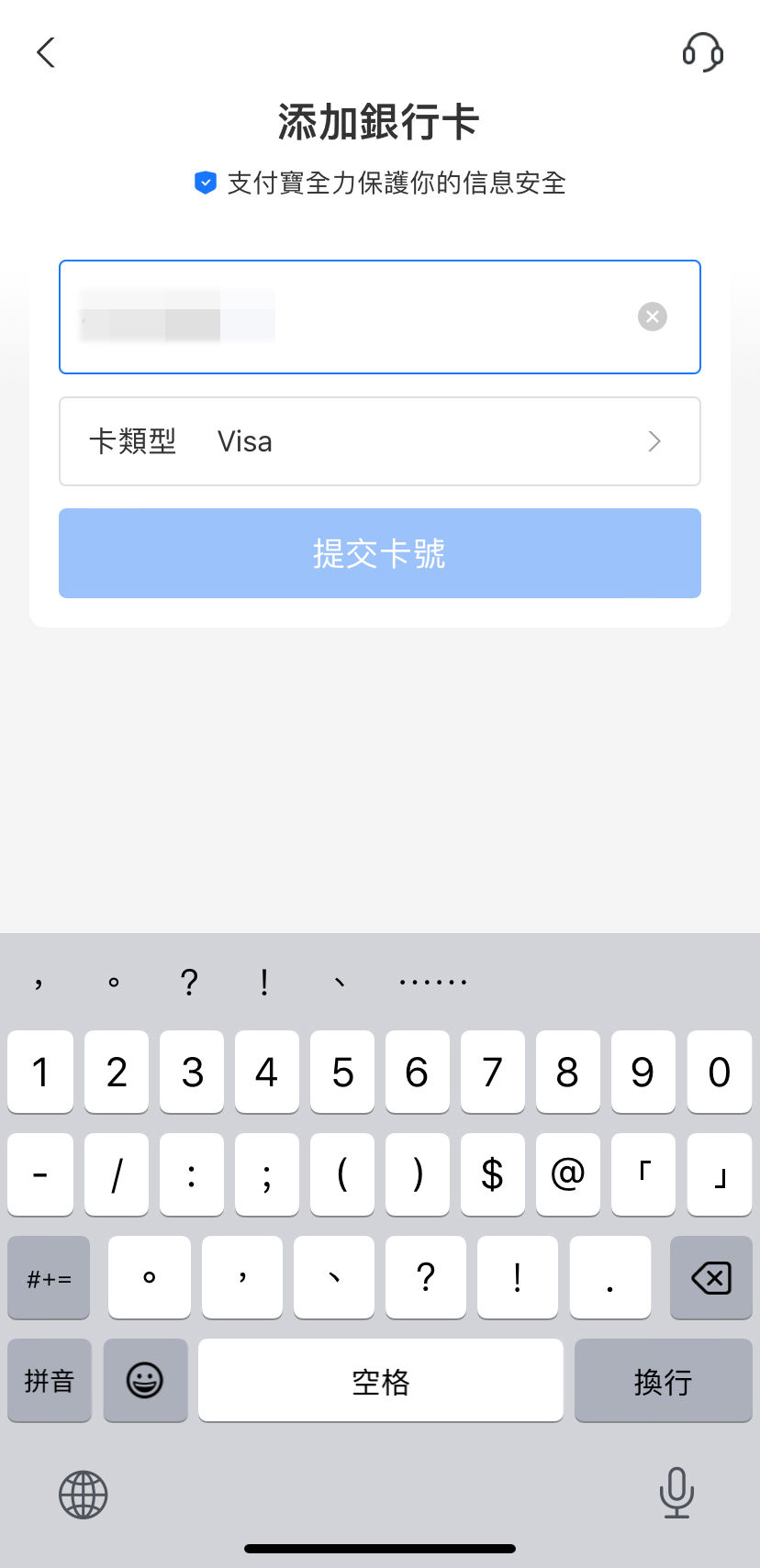
The card binding form in Alipay's English interface
Verify Your Identity with Your Passport
Identity verification is mandatory for transactions above ¥1,000 per day. Without verification, you can only spend ¥1,000 daily — enough for a casual day out, but not for hotel bookings or multiple purchases. We highly recommend completing verification right after linking your card.
What you need:
- Your passport (the physical book — take a clear photo of the photo page)
- A well-lit room for the face scan (liveness check)
How to verify:
- Go to the "Me" tab
- Tap your profile name/avatar at the top
- Tap "Identity Verification" or "Real-Name Verification" (实名认证)
- Select "Foreign Passport" as your ID type
- Upload a clear photo of your passport's photo page
- Complete the face scan — follow the on-screen instructions to blink, turn your head, etc.
- Wait for verification (usually instant, but can take up to 24 hours)
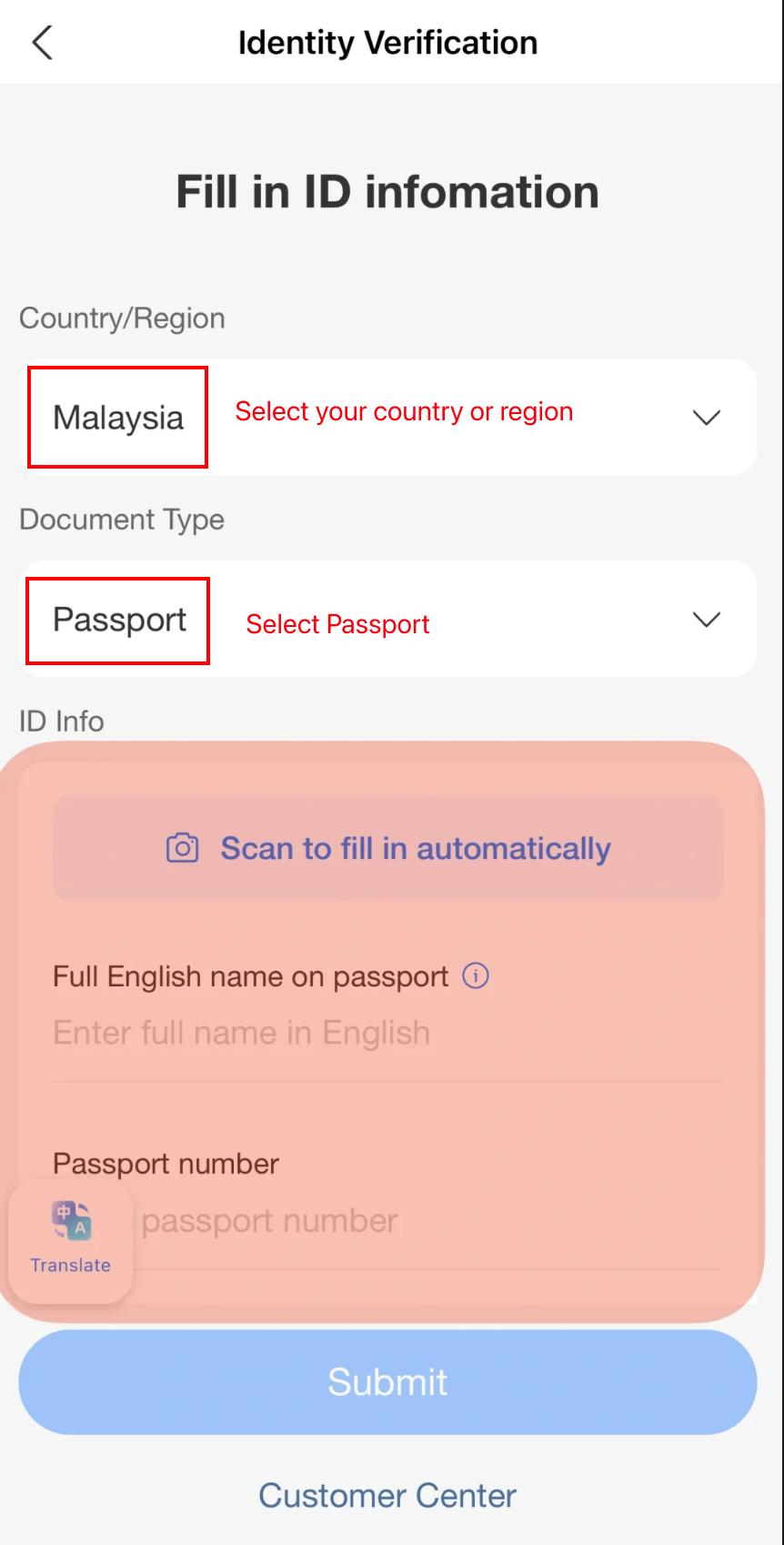
Identity verification flow — passport upload and liveness check
| Status | Daily Limit | Per Transaction | What You Can Do |
|---|---|---|---|
| Unverified | ¥1,000/day | ¥1,000 | Small purchases — food, drinks, metro, taxis |
| Verified (Passport) | ~¥35,000/day | ~¥35,000 | Everything — hotels, flights, large purchases |
Tour Pass: Prepaid Card That Skips the Fees
Alipay's Tour Pass (支付宝游护照 / Tour Pass Mini-Program) is an optional but highly recommended feature for international visitors. It creates a virtual prepaid card that you load with Chinese yuan (¥) upfront. When you pay with Tour Pass, the money comes from your prepaid balance — not directly from your credit card — which means no 3% transaction fee on payments over ¥200.
How Tour Pass Works
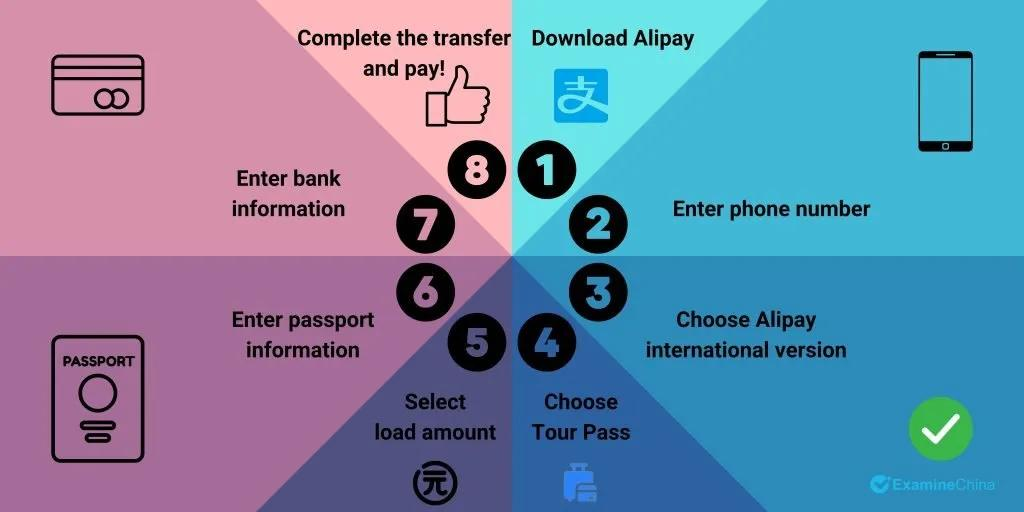
Tour Pass flow — load funds once, pay without fees
Key details:
- Load amount: ¥100 – ¥2,000 per load
- Validity: 90 days from the date of loading
- Refund: Any unused balance is automatically refunded to your original payment method after the 90-day period expires
- Fee: No transaction fees on any payment amount — even over ¥200
- Exchange rate: Uses Alipay's real-time exchange rate at the time of loading (generally competitive)
How to set up Tour Pass:
- In the Alipay app, tap "Search" at the top
- Search for "Tour Pass" or "支付宝游护照"
- Open the Tour Pass mini-program
- Tap "Get Started" or "Load Money"
- Enter the amount you want to load (¥100 – ¥2,000)
- Confirm the exchange rate and pay with your linked card
- The loaded amount appears as your Tour Pass balance
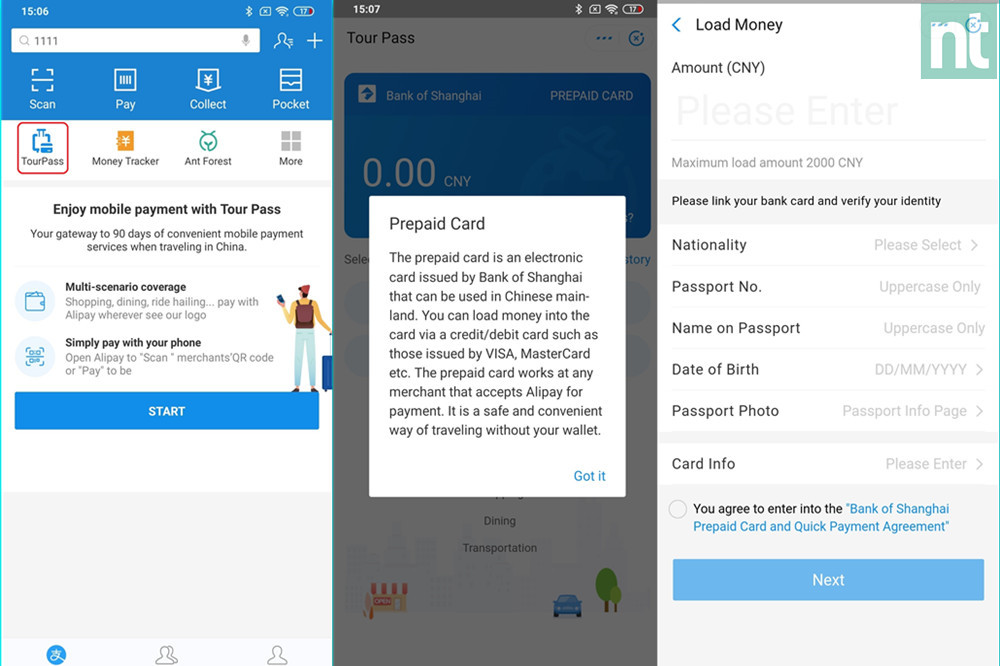
Tour Pass interface — balance and payment screen
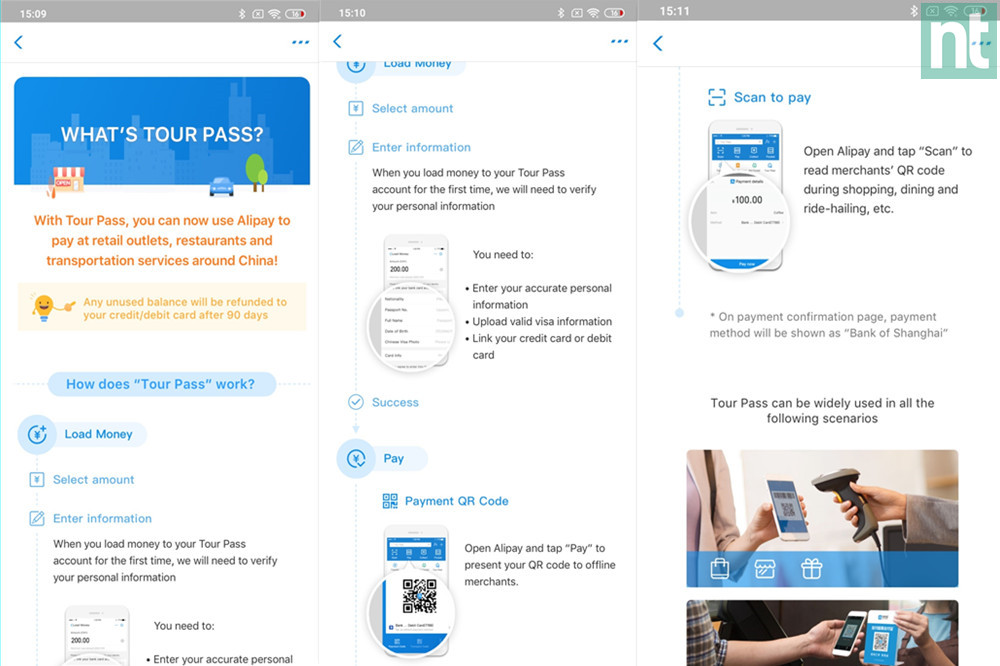
Tour Pass setup — search, load, and pay in three simple steps
| Feature | Direct Card Binding | Tour Pass (Prepaid) |
|---|---|---|
| Setup | Link card once | Load funds via mini-program |
| Payments under ¥200 | ✅ Free | ✅ Free |
| Payments over ¥200 | ~3% transaction fee | ✅ Free |
| Balance limit | Up to ¥35,000/transaction (verified) | ¥100 – ¥2,000 per load |
| Validity | No expiry | 90 days, then auto-refund |
| Best for | Long stays, large purchases | Short trips (under 90 days) |
| Can use both? | ✅ Yes — Tour Pass is used first, then falls back to direct card | |
How to Pay: Two Simple Modes
Once your card is linked and identity verified, paying with Alipay is incredibly simple. There are two payment modes, and you'll use both depending on the situation:
Mode 1: Scan the Merchant's QR Code
Use this when the merchant displays a QR code — at restaurants, shops, hotels, and most businesses.
- Open Alipay and tap "Scan" (扫一扫) at the top of the home screen
- Point your camera at the merchant's QR code
- Enter the amount (if not pre-filled) and confirm
- Enter your Alipay payment password or use Face ID
- Payment confirmed — you'll see a success screen and the merchant gets a notification
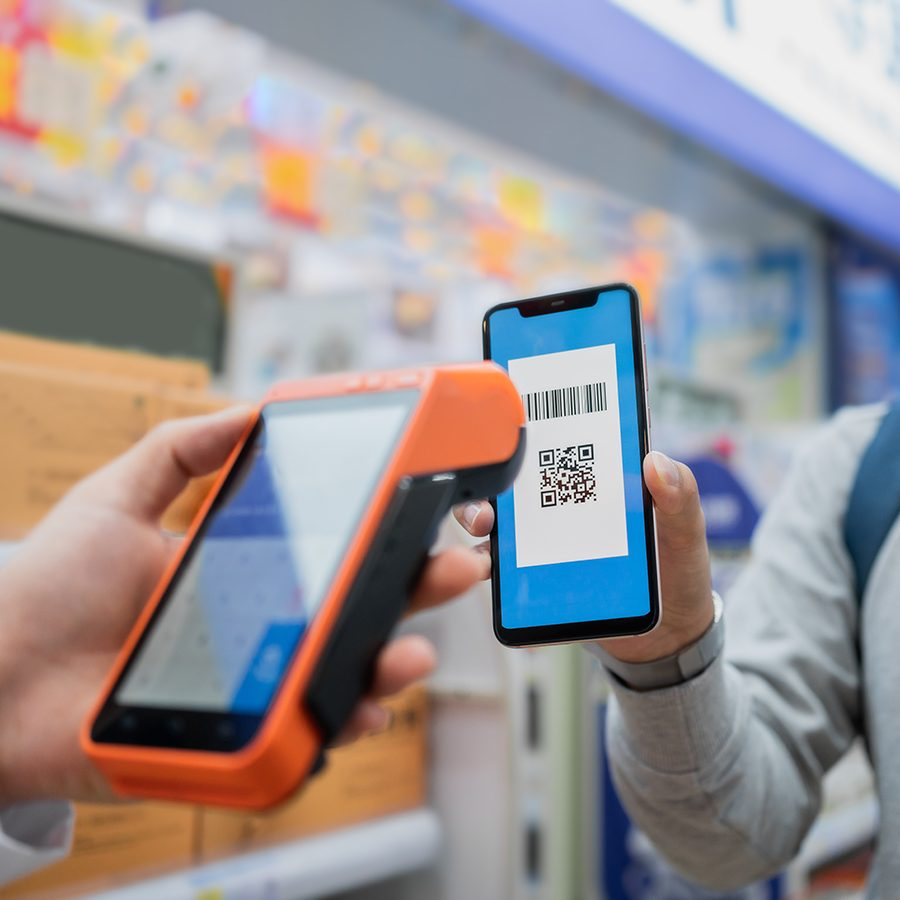
Scan the merchant's QR code to pay
Mode 2: Show Your QR Code to the Merchant
Use this at places where the merchant scans you — common at supermarkets, convenience stores, and metro stations.
- Open Alipay and tap "Pay" or "Collect & Pay" (付款) at the top of the home screen
- Your personal QR code appears on screen
- The merchant scans your QR code with their scanner
- Enter the amount on the merchant's device (or it's pre-set)
- Payment confirmed automatically — no password needed for small amounts under ¥1,000
Where Alipay Works in China
Alipay is accepted virtually everywhere in China. Here's a breakdown of where you'll use it most as a hiker and traveler:
| Location | Alipay Accepted? | Notes |
|---|---|---|
| Restaurants & cafes | ✅ Yes | From high-end to street food — scan the QR code on the table or at the counter |
| Convenience stores | ✅ Yes | 7-Eleven, FamilyMart, Lawson — show your QR code at checkout |
| Metro & subway | ✅ Yes | Scan to ride — open the metro mini-program in Alipay and scan at the turnstile |
| Taxis & ride-hailing | ✅ Yes | DiDi rides within Alipay, or pay taxi drivers by scanning their QR code |
| Street vendors & markets | ✅ Yes | Even fruit carts and shoe-shiners have QR codes |
| Hotels & guesthouses | ✅ Yes | Most accept Alipay — verify before booking |
| Scenic area tickets | ✅ Yes | Buy entrance tickets directly in Alipay mini-programs |
| Vending machines | ✅ Yes | Scan the QR code on the machine to pay and dispense |
| Online shopping | ✅ Yes | Taobao, Fliggy, Meituan — all integrated with Alipay |
| Mountain guesthouses | ✅ Usually | Most guesthouses at Tiger Leaping Gorge, Yubeng, etc. accept Alipay |
Fees & Transaction Limits
Understanding the fee structure and limits helps you avoid surprises and plan your spending:
| Item | Direct Card Binding | Tour Pass |
|---|---|---|
| Payments ≤ ¥200 | Free | Free |
| Payments > ¥200 | ~3% transaction fee | Free |
| Daily limit (unverified) | ¥1,000/day | ¥1,000/day |
| Daily limit (verified) | ~¥35,000/transaction | Up to loaded balance |
| Annual limit | ~¥70,000 (varies by card/bank) | ¥2,000 per load, reloadable |
| Currency conversion | Alipay's rate at time of transaction | Alipay's rate at time of loading |
Troubleshooting Common Issues
📱 SMS Verification Code Never Arrives
Problem: You tap "Get Verification Code" but never receive the SMS.
Solutions:
- Wait 5 minutes — international SMS can be slow
- Check your phone's SMS spam/junk folder
- Contact your mobile carrier to confirm they allow international SMS
- Try again on a different network (switch between WiFi and cellular)
- If using a Chinese SIM, ensure you have signal and SMS is enabled
- As a last resort, try registering with a different phone number
💳 Card Declined / Payment Failed
Problem: Your linked card is declined when making a payment.
Solutions:
- Call your bank and ask them to authorize transactions in China — this is the #1 cause of declined payments
- Check if your card has international transaction restrictions enabled
- Verify your card hasn't expired and has sufficient funds/credit
- Try removing and re-adding the card
- Try a different card (Visa and Mastercard have the highest success rate)
- Use Tour Pass instead — load funds once and pay without card-level declines
🪪 Name Mismatch Error
Problem: Card linking fails with a name mismatch error.
Solutions:
- Enter your name exactly as printed on your card — including middle initials
- If your card has no middle name but your bank account does, try without the middle name
- Check for extra spaces or special characters
- Match the case (all caps if your card uses all caps)
- Contact your bank to confirm the exact name on file
🚫 "This Merchant Doesn't Accept Your Card Type"
Problem: You scan a QR code and get an error about card type.
Solutions:
- The merchant may be using a personal collection QR code (个人码) which doesn't support international cards — ask for their merchant code (商户码)
- Try paying with Tour Pass instead — it works at more merchant types
- Pay with cash as a backup
- Try WeChat Pay as an alternative (if you have it set up)
Pro Tips for a Smooth Experience
🎯 Before You Arrive in China
- Download and fully set up Alipay on your home WiFi — don't wait until you land
- Call your bank to authorize international transactions in China
- Complete identity verification (passport + face scan) at home where you have good lighting
- Load ¥1,000–¥2,000 on Tour Pass to avoid fees on larger purchases
- Screenshot key screens (payment QR, Tour Pass balance) in case you lose internet
🎒 During Your Trip
- Carry ¥500–1,000 in cash as backup — some remote mountain guesthouses may not accept Alipay
- Keep your phone charged — a dead phone means no payment method. Bring a power bank.
- Buy a local eSIM or SIM card for data — Alipay needs internet to process payments
- If a payment fails, try Tour Pass before reaching for cash
- Keep your Alipay payment password memorized — you'll need it for larger transactions
- Download offline Google Translate pack — some merchant screens are still in Chinese
🏔️ On the Trail
- At mountain guesthouses, confirm Alipay acceptance when you check in
- Stock up on snacks and water at convenience stores before heading to trailheads
- For scenic area entrance tickets, buy via Alipay mini-program to skip ticket office queues
- Use Alipay's metro mini-program for public transit in cities before/after your hike
- Tip: Alipay works at most vending machines on mountain trails — great for emergency water
Alipay vs WeChat Pay: Which Should You Use?
Both Alipay and WeChat Pay are essential in China, and we recommend setting up both. However, if you only have time to set up one before your trip, here's how they compare for foreign visitors:
| Feature | Alipay 支付宝 | WeChat Pay 微信支付 |
|---|---|---|
| Foreign card support | ✅ Visa, Mastercard, JCB, Diners, Discover | ✅ Visa, Mastercard (similar process) |
| English interface | ✅ Full English translation | ✅ Full English translation |
| Tour Pass / prepaid option | ✅ Yes (avoid fees) | ❌ No equivalent (direct card only) |
| Setup difficulty for foreigners | ⭐⭐⭐⭐⭐ Smooth — designed for international users | ⭐⭐⭐ Can be tricky — WeChat registration itself can be difficult |
| Merchant acceptance | ~99% of merchants | ~99% of merchants |
| Beyond payments | Mini-programs for metro, tickets, hotels | Messaging, mini-programs, social features |
| Best for first-timers | ✅ Recommended — smoother setup | Set up after Alipay is working |
🥾 Ready to Explore China's Trails?
Now that your Alipay is set up, you're ready to pay like a local. Explore our curated hiking trails across China — each with detailed guides covering local payment options, booking requirements, and on-trail tips.
Explore China's Trails →
Last updated: July 2026. Alipay features and fees may change. Always verify the latest setup instructions before your trip.
Questions? Chat with our team on WhatsApp.